Michigan DNR Hunt Fish
- 3.5
- Rating
- 100.00K
- Installs
- Free
- Price
 Analysis by App-foxy
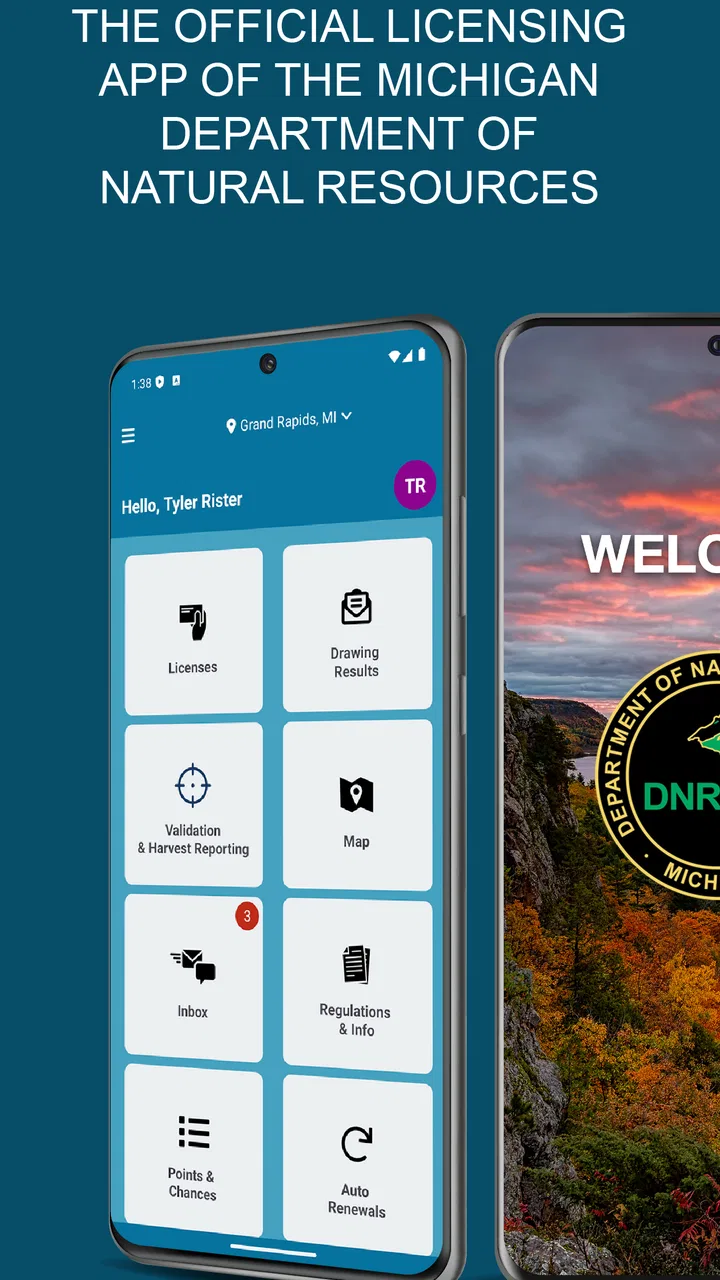
Michigan DNR Hunt Fish is the kind of sports app I would keep close when a fishing trip or hunting outing involves more than simply choosing a destination. It comes from the State of Michigan and serves as the official licensing app of the Michigan Department of Natural Resources. That purpose makes it more practical than entertaining: its value depends on how quickly and confidently I can use it while preparing for time outdoors.
I approached it as a companion for real planning rather than as a general sports-news application. The free price makes it easy to try, and the Everyone age rating keeps it broadly accessible. It has reached over 100 thousand installs, while its average rating sits at 3.4 from around 200 ratings, with more than 100 written reviews. That combination suggests a useful but not universally smooth experience, which matches my impression: the app has a clear job, but the quality of that job depends heavily on connectivity, preparation, and what I expect it to do.
How Michigan DNR Hunt Fish fits into an outdoor routine
The strongest way to understand this app is to place it inside a normal day. Before leaving home, I would use it as part of the administrative side of a trip: checking what I need, preparing the relevant licensing information, and making sure my phone is ready before heading somewhere with uncertain reception. That is a different role from a fishing forecast app, a mapping tool, or a social hunting platform.
You May Also Like

 Blood Strike: 2.5 Anniversary
Blood Strike’s Loadouts Turn Every Drop Into a Tactical Gamble
A close look at Blood Strike’s custom loadouts: how fast access to signature weapons reshapes its battle royale rhythm, rewards preparation, and narrows the gap between fights.

 Pandora - Music & Podcasts
Pandora’s Music Is Easy to Start, but Harder to Recover
Pandora’s strength is its low-effort path from a seed to a station. Its weak spot is how much confidence it asks you to place in connection, setup, and quiet recovery.

 8 Ball Pool
 Is Built on Rivalries, Rematches, and Routine
A close look at the rivalries, rematches, shared routines, and unanswered safety questions that turn a quick pool match into a persistent mobile community.

 Samsung Music
’s Quiet Strength Is Playing What You Already Own
Its reach comes less from spectacle than from dependable access to a personal library. That simplicity is both the app’s strongest retention engine and its ceiling.

 AccuWeather: Weather Radar
AccuWeather Review: A Quick, Clear Forecast for Everyday Decisions
For everyday plans, the best forecast is the one you can understand quickly. AccuWeather makes rain timing, radar, and local conditions easy to act on, with a few trade-offs.

 Hill Climb Racing
Why Hill Climb Racing Still Turns Crashes Into One More Run
A tiny car, a bumpy hill and one more upgrade: Hill Climb Racing keeps resurfacing because its simple chaos makes every near-miss feel personal.
More From Our News Desk
View All News


This distinction matters because many people search for one outdoor app that handles everything. Michigan DNR Hunt Fish is better viewed as the official state-focused piece of a larger setup. A map app may be more useful for roads and trails. A weather service may provide a clearer forecast. A specialized fishing app may offer more discussion or planning features. The DNR app earns its place by dealing with Michigan’s licensing needs, not by replacing every other tool on a phone.
I also appreciate the official origin. When a task involves permits, licenses, or state rules, an app maintained by the State of Michigan feels more appropriate than relying on an unofficial summary or a screenshot shared in a group chat. That does not remove the need to read the applicable regulations carefully, but it gives the app a more trustworthy role in the preparation process.
Connectivity changes the best time to use it
The most important practical lesson is simple: I would not wait until I am standing at a remote launch, trailhead, or wooded parking area to begin every important task. A licensing app can be perfectly useful in town and still become awkward when the phone has a weak signal. Screens may load slowly, account actions may take longer, and any process that depends on communication with a service can become stressful when I am already trying to get moving.
For that reason, I would open the app at home or somewhere with reliable service, complete the preparation that requires a connection, and then check that the result is easy to reach before leaving. This is not a claim that the app provides offline access; it is a sensible habit for any service whose central functions may need network communication. Prepare while connected, rather than treating the shoreline or forest as the place to finish setup.
That workflow is especially useful for early starts. If I am leaving before shops or offices are open, I do not want a last-minute licensing question to become the first problem of the day. Spending a few minutes with the app the evening before can expose missing account details, forgotten credentials, or uncertainty about what I need to carry.
Useful in the car park, less comfortable in the field
On a mobile device, the app’s advantage is immediate access. I do not need to carry a separate paper reference for every administrative detail, and I can check the relevant information from the same phone I already bring outdoors. That is convenient when plans change, when I decide to fish after another activity, or when I need to confirm that I have handled the licensing part of the trip.
There is a trade-off, though. Outdoor use is rarely ideal for phone interaction. Bright sunlight can make screens difficult to read, wet hands make tapping less pleasant, and gloves can turn small controls into a nuisance. A phone battery that was healthy at breakfast may be much lower after navigation, photographs, weather checks, and calls. I would therefore use the app deliberately instead of repeatedly opening it throughout the day.
A realistic example is a weekend drive to a new fishing area. Before leaving, I would use Michigan DNR Hunt Fish to prepare the licensing side of the outing. At the destination, I would rely on a map for directions and keep the DNR app available for the specific state-related information it handles. If the signal is weak, I would avoid making the trip depend on a fresh transaction or an unexpected lookup at that exact moment.
What to do when the connection fails
Connectivity problems are not always dramatic. Sometimes the app opens but a page takes too long. Sometimes a request appears to stall, or the phone changes between a weak cellular signal and a stronger Wi-Fi connection. In those moments, repeatedly tapping the same button is usually not the best response. I would first check whether the phone actually has service, wait briefly, and then retry once rather than creating duplicate actions or adding confusion.
The better recovery plan begins before the trip. I would keep confirmation details or other important records available in the form the app provides after a successful connected session, while also following any applicable state requirements for what must be shown or carried. I would not assume that an app screen alone settles every legal question. The app is a helpful administrative tool, but responsible outdoor preparation still includes understanding the rules and bringing whatever documentation or identification is required.
If the app behaves differently after an update, I would check the version installed and restart the application before assuming that the account or license information is gone. The current version is 1.2026.0515.1, and the app requires Android 7.0 or later. Keeping the application current can reduce avoidable compatibility trouble, but updating immediately before a remote trip is not my preferred approach. I would rather update while connected at home, open the app afterward, and confirm that I can still reach the information I expect.
When a phone is shared between family members, recovery also means being clear about whose account or licensing information is displayed. I would avoid assuming that one person’s successful setup automatically covers another person. That small check is easy to overlook when everyone is loading gear into a vehicle, yet it can prevent an uncomfortable discovery after arrival.
Using less data without making the app harder to use
I would not treat mobile data as unlimited simply because the app is free. The price of the download and the amount of network data used are separate concerns. If I am planning a trip from home, Wi-Fi is the sensible place to open the app, install updates, and complete connected tasks. That preserves cellular data for navigation, emergency communication, or weather information once I am on the road.
There is also a practical battery benefit to reducing unnecessary phone activity. I would avoid leaving several outdoor apps refreshing in the background, keep the screen off when I am not actively checking something, and take screenshots only when they are genuinely useful and permitted for the situation. A screenshot can be a convenient personal reference, but it should not be treated as a replacement for official requirements or a guarantee that a stale image remains valid.
For a group trip, one person can handle preparation for their own needs, but I would not assume that passing around a single phone solves everyone’s licensing responsibilities. The efficient approach is to organize each person’s information before departure and avoid turning a poor-signal location into a group administration session. This is one of the less obvious benefits of planning early: the app becomes a short preparation step instead of a shared bottleneck.
People with limited storage or older phones should also pay attention to the basic device requirement. Android 7.0 support makes the app available to a wide range of devices, but compatibility alone does not guarantee a pleasant experience on every older handset. A phone with a tired battery, little free storage, or an outdated connection may make any connected service feel less dependable. I would test the app on the actual phone I plan to carry, not just on a newer household device.
Where it beats ordinary alternatives
The clearest advantage over a general web search is focus. Searching the wider internet can produce outdated pages, informal explanations, or results from other states. A state-specific application gives me a more direct starting point for Michigan’s own licensing context. That is valuable when I want to reduce guesswork before a trip.
It also has an advantage over relying solely on paper. Paper can be excellent as a backup, especially in places with poor reception, but it may not be as convenient when information changes or when I need to manage a personal transaction. The app and paper are not necessarily rivals; for a serious outing, I prefer the app for preparation and a sensible backup plan for situations where the phone is unavailable.
Against a general fishing or hunting application, the comparison is less about which one is “better” and more about purpose. A recreational app may be more engaging for conditions, maps, catches, or community discussion. Michigan DNR Hunt Fish is the better choice when the state licensing function is the priority. I would use both if my trip required both kinds of information, rather than expecting the DNR app to provide the depth of a specialist tool.
Who will appreciate it and who may want another tool
I would recommend it to Michigan anglers and hunters who want an official mobile route for handling the licensing side of outdoor activities. It is also a sensible option for occasional participants who do not want to build a complicated collection of state-related resources. The free price lowers the barrier to trying it, and the broad age rating makes it suitable for families who are organizing outdoor plans together, with adults still responsible for making sure all requirements are understood.
I would be more cautious about recommending it as the only application for a remote expedition. Someone who needs detailed offline mapping, extensive weather intelligence, route recording, or a rich hunting community should choose a dedicated tool for those jobs. Likewise, a person who dislikes doing administrative tasks on a phone may prefer to prepare through another official channel when available and use the app only as a secondary reference.
The average rating of 3.4 shows that the experience is mixed rather than universally polished. I would read that as a reason to test it before an important trip, not as an automatic rejection. Install it, sign in or begin the relevant preparation while connected, and make sure the screens and information you need are accessible on your device. That short trial is more useful than discovering a problem at the destination.
My connectivity verdict
After looking at the app through the lens of real outdoor use, I see Michigan DNR Hunt Fish as a practical official companion, not a complete digital field kit. Its strength is the state-specific licensing role and the convenience of having that preparation on a phone. Its weakness is the dependence on a careful workflow: poor reception, low battery, an untested update, or last-minute preparation can all reduce its usefulness.
I would install it before a Michigan fishing or hunting trip, use it on a reliable connection, and treat the field session as a verification step rather than the moment when everything must be completed. I would also pair it with mapping, weather, and backup planning when the destination is remote. That approach respects what the app does well without asking it to become something else.
For me, the deciding question is not whether it replaces every alternative. It does not. The question is whether I want an official Michigan-focused licensing tool available on my phone. If the answer is yes, Michigan DNR Hunt Fish is worth trying, especially because it is free. Just give it a connected test run before departure, keep expectations focused on its actual purpose, and do not let a weak signal become the most important part of the trip.
FAQs for Michigan DNR Hunt Fish
01What features does the Michigan DNR Hunt Fish app offer?
The Michigan DNR Hunt Fish app provides users with a range of features including the ability to purchase and store hunting and fishing licenses, access to regulations, interactive maps for hunting zones, and real-time updates on conditions and closures. It also offers educational resources and tips for a successful and safe outdoor experience.
02Is the Michigan DNR Hunt Fish app available for both Android and iOS?
Yes, the Michigan DNR Hunt Fish app is available for download on both Android and iOS platforms. It can be found on the Google Play Store for Android users and the Apple App Store for iOS users. Ensure your device meets the necessary system requirements for optimal performance.
03Can I use the app without an internet connection?
While some features of the Michigan DNR Hunt Fish app may work offline, such as accessing previously downloaded maps and stored licenses, most features require an internet connection. Real-time updates, purchasing licenses, and accessing the latest regulations will need connectivity to function properly.
04How secure is my personal information on the Michigan DNR Hunt Fish app?
The app employs robust security measures to protect users' personal information. It uses encryption to secure transactions and data storage. However, users should always practice caution and ensure their devices are secure by using strong passwords and keeping their software up to date.
05Are there any costs associated with using the Michigan DNR Hunt Fish app?
Downloading the Michigan DNR Hunt Fish app is free, but users need to pay for any licenses or permits purchased through the app. There are no hidden fees within the app itself, but standard data rates may apply depending on your mobile carrier's plan.
Pros
- User-friendly interface for easy navigation.
- Comprehensive guide to hunting regulations.
- Real-time updates on fishing conditions.
- Offline access to maps and data.
- Personalized tracking of licenses and permits.
Cons
- Limited to Michigan-specific information.
- Requires registration for full features.
- Some features need a stable internet connection.
- Occasional app crashes reported by users.
- No support for multiple language options.

Michigan DNR Hunt Fish
Gallery